RomM 5.0 Lands With a Ground-Up Redesign and Cross-Device Save Sync
RomM, the self-hosted library manager for retro game collections, hits 5.0 with a full redesign, a new cross-device save sync engine, and past 10K GitHub stars.

RomM, the open-source, self-hosted library manager for retro game collections, shipped version 5.0.0 today, and it is the biggest release in the project’s history.
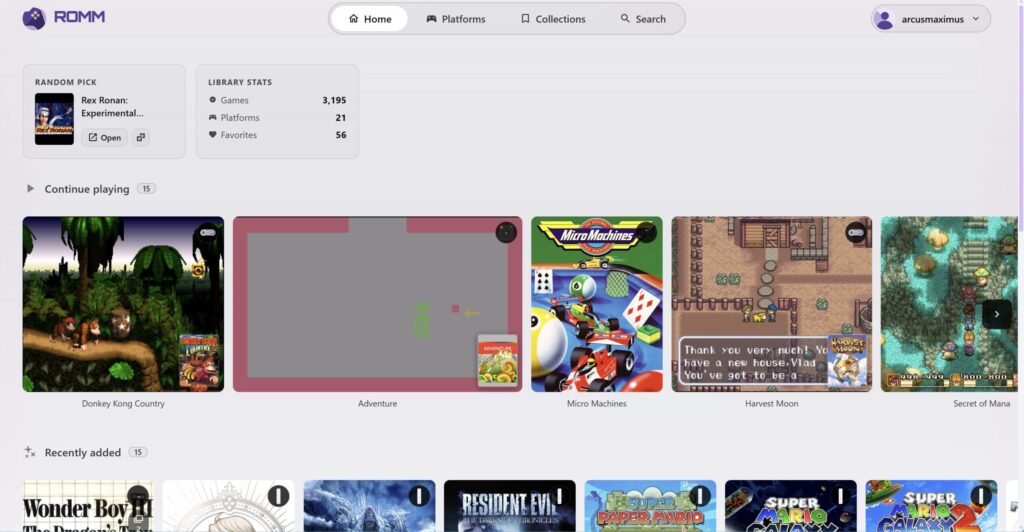
If you have not run into RomM before, think of it as Plex or Jellyfin for your ROMs. You point it at your own game files, it scrapes box art, metadata, and platform info, and it hands you a clean web interface to browse, launch, and manage the whole collection from one place. It runs on your hardware, and your library stays yours.
Version 5.0 opens with a ground-up redesign: a new design system, a fresh visual language, and, for the first time, universal support for both controllers and touch input, so the same interface works whether you are at a desktop, on a phone, or on a handheld.
The headline addition is a brand new save sync engine that keeps your progress in step across devices. Cloud saves launch with two integrations, Argosy Launcher on Android and Decky RomM Sync on the Steam Deck, with first-party and third-party support for more apps and devices promised soon.
The rest of the 5.0 feature list runs deep:
- Real-time log streaming and filtering
- Sharing savestates with other users, handy for speedruns, unlocks, and New Game Plus
- Server-side ROM patching
- QR code pairing for devices
- A built-in music player for game soundtracks
- Controller debugging tools
- Changelog previews
- Interactive 3D boxart
- CRT shader mode
There are also more than fifty bug fixes and performance improvements under the hood.
The community numbers are just as notable. RomM has now passed 10,000 stars on GitHub, a real milestone for a self-hosted project that lives almost entirely on word of mouth. Around it, a small ecosystem of third-party apps has grown up: Decky RomM Sync pulls your library into Steam as shortcuts on the Deck, while RetroArch Sync, RomMate, and RomM Client handle syncing, downloads, and launching straight into emulators from the desktop.
How I Use It
I have been self-hosting POCG and everything around it for decades, so RomM was always going to be my kind of tool. I run it on my home server as the front end to my own collection, and it is the first thing that has ever made that pile of files feel like an actual catalogue: proper box art, clean metadata, everything browsable in a tab instead of buried in folders named after whatever I called them fifteen years ago.
What I like most is that it is mine. The data lives on my hardware, there is no account to lose and no service to shut down, and it fits the same self-hosted, own-your-stuff philosophy this whole site is built on. With 5.0 and the new sync engine, the saves on my handhelds finally stay in step with the server, which was the one piece I always used to do by hand. If you keep a retro library and you have somewhere to run it, this one is worth an afternoon of setup.
RomM 5.0.0 is available now. The full feature breakdown and complete changelog are in the official release notes.